

Guide
However you are interacting with the API, a few conventions hold throughout. They are defined here.
Coordinate system & side definitions
Section titled “Coordinate system & side definitions”Throughout the process we need to be able to refer to sides and directions, while catering for part rotation.
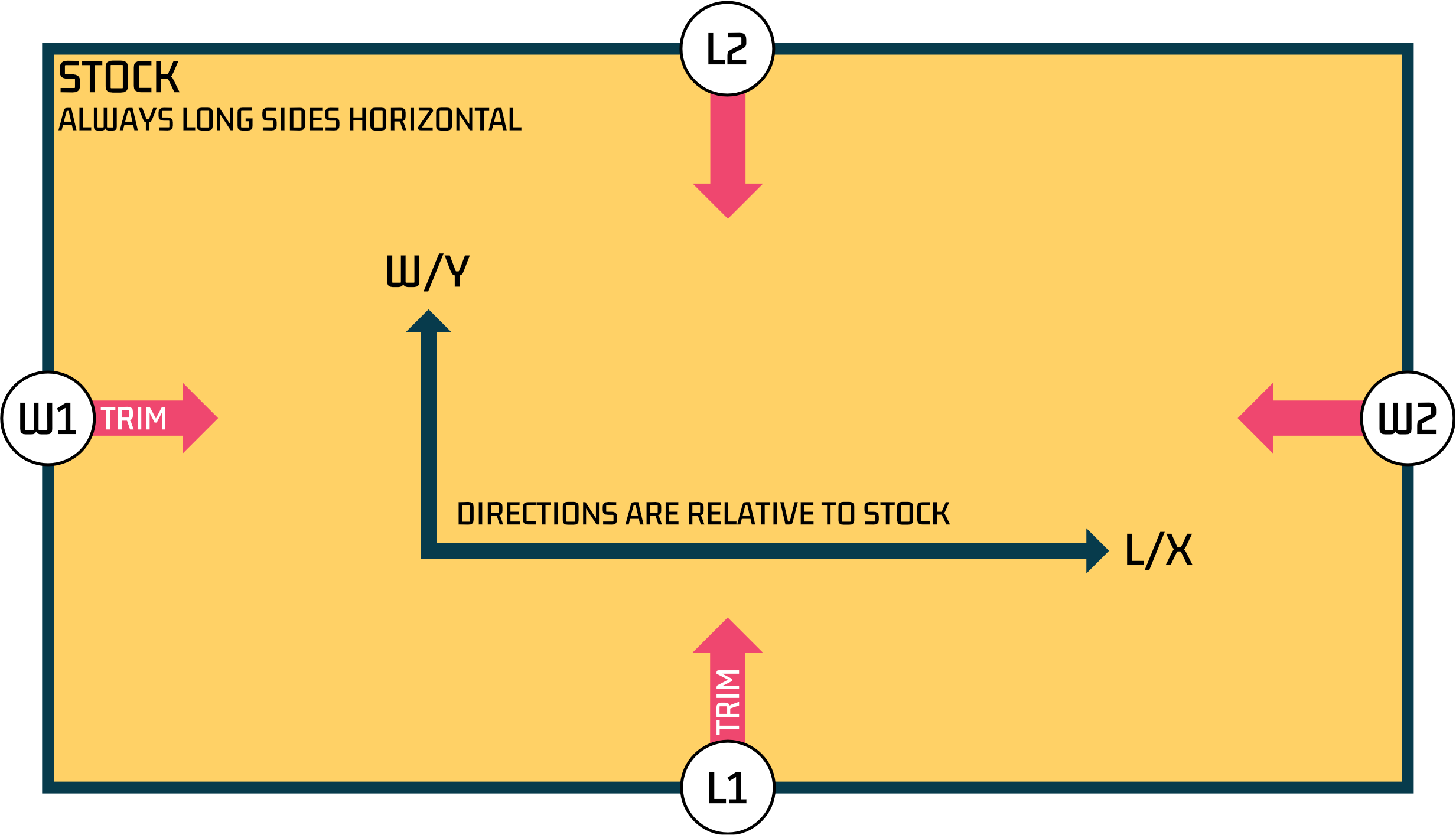
For our x and y coordinate system, y increases as you move up.
The side labels are used throughout. L indicates stock length if used as a direction or the longer side. W indicates stock width (shorter side) if used as a direction or the shorter side.
- Stock is always arranged with the long sides horizontally. Stock never rotates.
- Longer sides are labelled L1 and L2.
- Shorter sides are known as the width and labelled W1 and W2.
- Adding trim to stock.trim.l1 will trim moving in from the bottom side, reducing the width of the stock.
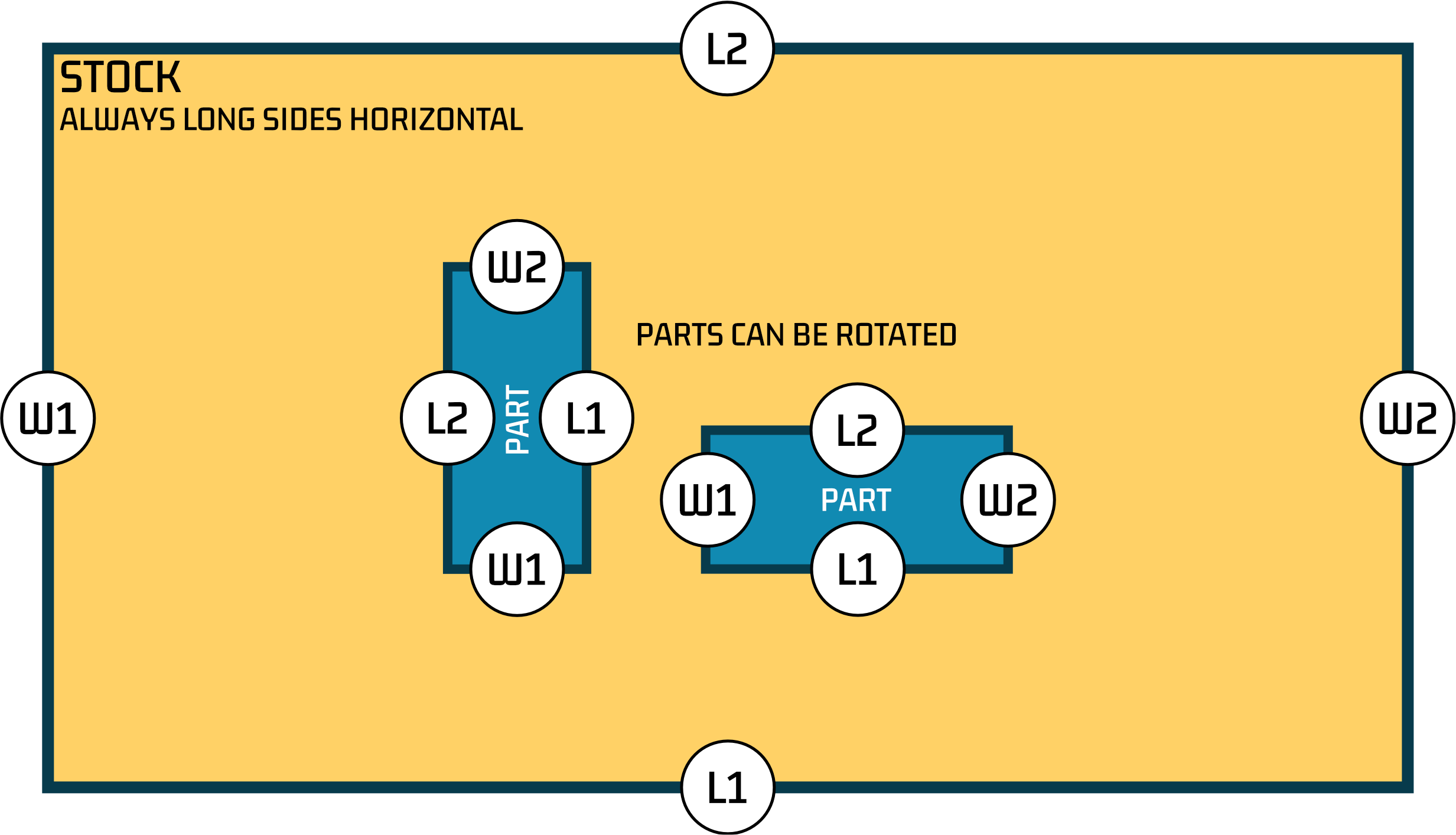
- Parts can rotate, but as the L1,L2,W1,W2 sides refer to the longer and shorter sides these values do not change with rotation.
Orientation models
Section titled “Orientation models”To suit various local conventions for defining part orientation we support different orientation models. These define how part rotation is defined and how sides are labelled.
Model 0 (default, used by API)
Section titled “Model 0 (default, used by API)”- Model 0 is used by the API.
- For model 0, the part orientation is defined by the orientationLock property on the part. The values for part.l and part.w DO NOT affect rotation.
- On stock without grain, orientationLock = ‘l’ means the longer side of the part is aligned with the longer side of the stock (this is horizontal on our diagrams).
- On stock with grain, the lock is read relative to the grain: orientationLock = ‘l’ means the part’s length follows the grain, ‘w’ means its width follows the grain, whichever axis the grain runs along. Leave it empty for free rotation.
Model 1 (can be used by UI)
Section titled “Model 1 (can be used by UI)”- Orientation is controlled by the values in the ‘length’ / ‘l’ and ‘width’ / ‘w’ properties of each part.
- The part is rotated so that the side defined by the ‘l’ property is aligned with the longer side of the stock.
- Clicking the rotation button allows for free rotation, overriding the l/w defined orientation.
- Side labels (L1/L2/W1/W2) are not remapped in outputs. They always use the internal definition shown in the diagrams above, which is separate from the L and W dimension columns.
Model 2 (can be used by UI)
Section titled “Model 2 (can be used by UI)”- Orientation is controlled by the values in the ‘length’ / ‘l’ and ‘width’ / ‘w’ properties of each part.
- The value used in the ‘length’ / ‘l’ property determines the grain dimension.
- Clicking the rotation button allows for free rotation, overriding the l/w defined orientation.
- Banding L values match L column values
- L and W columns are updated in exports to match local expectations (e.g. CSV output)
- Side labels (L1/L2/W1/W2) are not remapped in outputs. They always use the internal definition shown in the diagrams above, which is separate from the L and W dimension columns.
Use of sides (L1,L2,W1,W2)
Section titled “Use of sides (L1,L2,W1,W2)”Where sides are defined directly, for example in banding.sides or trim, our internal definition of L1,L2,W1,W2 always applies. The orientation model makes no difference. The diagrams above show that definition.
Related
Section titled “Related”- API reference is where these conventions are applied, field by field.
- Embedded diagrams render the layout using the coordinate system above.
- Webhooks deliver the result once an optimisation finishes.